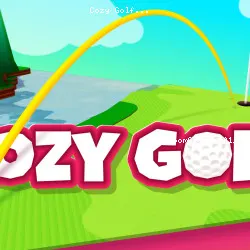
The Sports, 3D, Golf, Relaxing, Physics, Ball, Skill Challenge in Cozy Golf
supernice.games • 190.4K Plays • 1.1M Views • star 4.5 (9.3K)
All
Device
Both
Orientation
9.3K ratings
Rate This Game
gamepad How to Play Cozy Golf
Controls
Use the left mouse button to hit and aim the golf ball.
info About Cozy Golf
Play Cozy Golf right on Classroom6x Game without needing any extra installation. Every feature supports its identity within the Sports games, 3D, Golf, Relaxing, Physics, Ball, Skill category. The experience in Cozy Golf is built to keep the focus on the most important elements of the Unblocked Games at School genre.
It offers an online experience suited for fans of Browser Games Unblocked. Just visit Classroom6x Game and you can start playing Cozy Golf instantly.
Cozy Golf is a relaxing golf adventure that invites you to unwind across beautifully designed courses filled with charm and color. You’ll perfect your swing, line up satisfying shots, and enjoy a calm atmosphere backed by soothing music. Easy to learn yet delightfully challenging, it’s the ideal escape for anyone who loves precision and peaceful competition.
Features
- Beautiful Courses: Explore 3 unique courses, each with 9 handcrafted holes (27 in total). And look out for more courses in future updates!
- Star-Based Progression: Master each hole by aiming for Par or better! You'll earn 3 stars for being under par, 2 stars for par, and 1 star for a bogey. Use your collected stars to unlock new courses and take on fresh challenges.
- Relaxing Atmosphere: Enjoy a calm soundtrack, satisfying sound effects, and lovely animations that make every shot, splash, and hole-in-one a delight.
- Player-Friendly Design: Get the perfect overview with a switchable bird's-eye camera. Made a mistake? No problem! Use the handy "undo" button to retry your last shot.
Guide
- Click and hold the golf ball.
- Drag downwards and away from the ball. A trajectory line will appear.
- The distance you drag determines the power of your shot.
- The direction you drag (left or right) sets your aim.
- At the end of the trajectory, you'll see an accuracy indicator with a moving arrow. To hit the ball straight, release the mouse button (or your finger) when the arrow is exactly in the center. Releasing it off-center will cause your shot to curve left or right.
- Camera View (Top-Left): Tap the icon to toggle between the standard 3D view and a top-down bird's-eye view for a better look at the hole.
- Undo Shot (Bottom-Right): Next to the Par info, this button lets you take back your last stroke and try again.
- Menu (Top-Right): Access the menu to restart the current hole, adjust sound and music settings, or exit to the course selection screen.
Technology
Related Games
 verified
Electron Dash
 verified
Rally Point
 verified
Super Star Car
 verified
Nugget Royale
 verified
Eggy Car
 verified
Rooftop Snipers
 verified
Striker Dummies
 verified
8 Ball Pool
 verified
A Small World Cup
 verified
circloO 2
 verified
House of Hazards
 verified
Soccer Random
 verified
Drift Hunters
 verified
Boxing Random
 verified
Basket Champs
 verified