Moto X3M 5: Pool Party - Online Game Experience
MadPuffers • 178.6K Plays • 357K Views • star 4.5 (3K)
All
Device
Landscape
Orientation
3K ratings
Rate This Game
gamepad How to Play Moto X3M 5: Pool Party
Controls
- W or up arrow to accelerate
- AD or left/right arrow to tilt
- S or down arrow to brake
info About Moto X3M 5: Pool Party
Play online and join thousands of active players worldwide. The more you play Moto X3M 5: Pool Party, the more clearly you can see how the game develops from the basic foundations of the Play Games at Classroom 6X genre.
The game maintains consistent stability during play sessions. iframe helps Moto X3M 5: Pool Party run more easily on widely used systems. Do not miss the chance to experience Moto X3M 5: Pool Party.
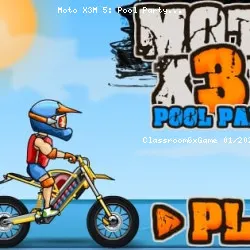
Moto X3M 5: Pool Party is the 5th excellent title in the Moto X3M series. The gameplay is just as exciting as in the original Moto X3M: you control a motocross bike and must work your way through a series of levels as fast as you can.
How to Play Moto X3M Pool Party
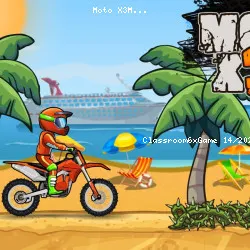
The theme of this title is a pool party, as you'll be bike racing across and even through plenty of water. You encounter everything from the sunshine and waterslides to giant tubes and umbrellas. The beach setting is fantastic, and the new levels really are fun to play. There are 22 levels in total.
You have to find the right precision between speed and jumps to get past all the obstacles in your way. It is a WASD-controlled game where W accelerates, A moves left, D moves right, and S acts as your brakes. You can also use the arrow keys to navigate.
Differences between Pool Party and other Moto X3M
The theme of this title is a pool party, as you'll be bike racing across and even through plenty of water. You encounter everything from the sunshine and giant underwater tubes to slippery waterslides, poolside obstacles and thematic traps of all sorts. The beach setting is fantastic, and the new levels really are fun to play. There are 22 levels in total.
Pool Party is considerably more complex than its predecessors, even the first few levels are hard to beat or gain three stars in: taking advantage of backflipping opportunities it’s even more convenient than in past instalments, as those 0.5 seconds can make the difference between getting the maximum score of each round or not.
Can you show off your stunt skills and become a top Moto X3M racer?
Tip
- For increased speed, you can accelerate while performing a wheelie by pressing down.
- The A and D are vital for tricks like front and back flips.
Release Date
March 2019
Developer
MadPuffers made this game. They have also developed other great sports games, including basketball and soccer games!
Features
- A fantastic bike stunt game
- 22 levels to beat
- A lovely beach background
- Dangerous obstacles
- Three biker options
- Fullscreen mode available
Platform
Web browser (desktop and mobile)
More Games Like This
Dive into more driving game fun with Eggy Car or drive a bobsled in Snow Rider 3D!
Technology
play_circle Moto X3M 5: Pool Party - Gameplay
Related Games
 verified
Rally Point
 verified
Super Star Car
 verified
Plactions
 verified
Jumping Clones
 verified
A Small World Cup
 verified
circloO 2
 verified
House of Hazards
 verified
Blocky Trials
 verified
Death Chase
 verified
Drift Hunters
 verified
Robox
 verified
Idle Mining Empire
 verified
Teleport Jumper
 verified
Moto X3M
 verified
Mad Truck Challenge Special
 verified